MDB Products
Released
Getting Started
MDB Developers' Playground - Code Samples and Examples
Title
Message
Create new category
What is the title of your new category?
Edit page index title
What is the title of the page index?
Edit category
What is the new title of your category?
Edit link
What is the new title and URL of your link?
First steps - Using USB
Copy Markdown
Open in ChatGPT
Open in Claude
This page is only relevant for the Pi Hat USB, if it is to be operated through USB.
To use the USB connector to communicate with the Pi Hat USB, it is necessary to configure the USB selection jumper accordingly. The jumper position on the PCB is shown below
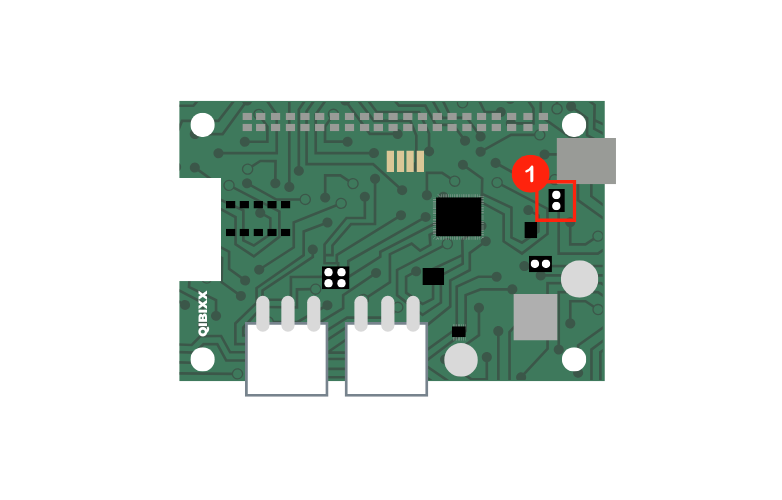
| Jumper | Name | Description |
|---|---|---|
| 1 | USB toggle jumper | This jumper must be closed when the device is to communicate with its host via USB, if the device is to be operated from the UART port, the jumper should be left open. |
When operated through USB, the Pi Hat USB can communicate with its host in the same way as the MDB USB. Please refer to the First Steps page of the MDB USB page to understand how to setup the connection on your OS.
Type to search, ESC to discard
Last updated on
Next to read:
Connectors & Jumpers(C) 2024 Qibixx AG - contact us with any questions: info@qibixx.com
Discard Changes
Do you want to discard your current changes and overwrite with the template?
Archive Synced Block
Message
Create new Template
What is this template's title?
Delete Template
Message