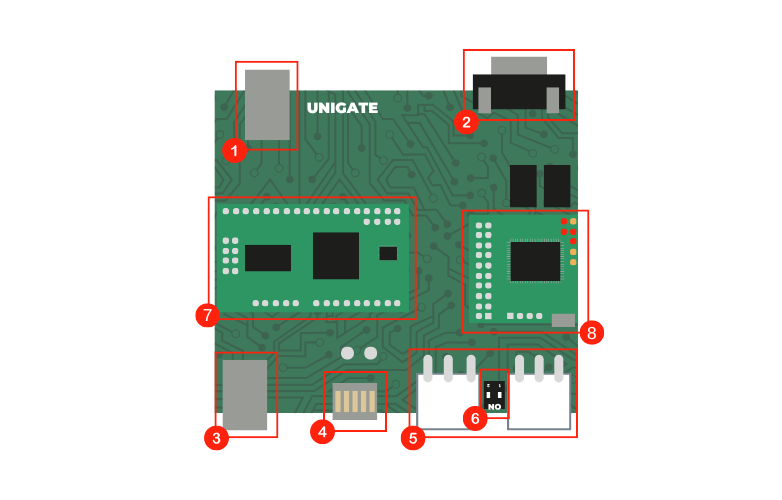
Connector | Description |
|---|---|
1 | USB External devices |
2 | DB15 (RS232, 2 Inputs, 2 Relays, Power) |
3 | Ethernet |
4 | Led Bar (Master TX & RX, Slave TX & RX and Power) |
5 | MDB Connectors - VMC (left) and Peripheral (right). Can also be used to power the device 'VMC', is an MDB master interface suitable to BE a VMC and connect peripherals, and the right connector labelled 'Peripheral' is an MDB slave port which usually connects to a VMC or other MDB master |
6 | VMC/Peripheral Bridge These jumpers bridge the two MDB connectors (Master and Slaver). The switch should normally be ON (it is needed for sniffing). *Turn it OFF if you need separate master and slave functionality (also known as Split Mode). |
Interfaces
Interface | Description |
|---|---|
7 | Barix Processor IPAM 404 |
8 | MDB Mini |
The MDB Mini is where we have our firmware loaded to allow you to use our API. The MDB Mini is an external device, so to access it you can use minicom like the following command: minicom -D /dev/ttyACM0
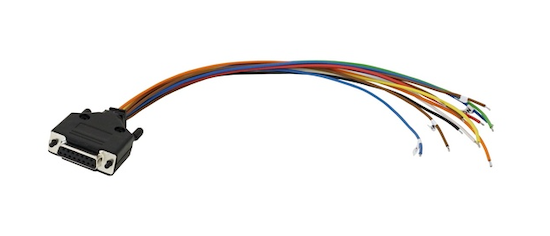
DB15 Pinout
Pin | Description | DB15 Adaptor - Color Schema |
|---|---|---|
1 | GND | |
2 | RXD232 | White |
3 | TXD232 | Green |
4 | RL1 NC | Blue |
5 | RL1 NO | Blue |
6 | RL2 COM | Brown |
7 | GND | Black |
8 | PWR IN | Red |
9 | GND | |
10 | Input 2 | Orange |
11 | Input 1 | Yellow |
12 | RL1 COM | Blue |
13 | RL2 NC | Brown |
14 | RL2 NO | Brown |
15 | VCC 5V |